Translated from the Chinese original.
I recently got a Miwu Art keyboard, which has a voice wake-up key. On Win10, though, it wakes Cortana by default, and as everyone knows, Cortana is basically useless on Win10. So a natural idea came up: how do I replace the Cortana wake-up with Xiao Ai (Xiaomi’s voice assistant)?
First, key detection showed that the keyboard’s voice key actually simulates the Win+C shortcut to invoke Cortana. So the question became: how do I make Win+C wake Xiao Ai instead?
For custom hotkeys I’ve always used HotKeyP. I wanted to simply add a command line that opens Xiao Ai, but awkwardly found that Xiao Ai is a UWP app: it has no .exe file and can’t be called through a shortcut either.
So the question changed again: how do I wake the UWP version of Xiao Ai from the command line?
How to open UWP apps from the command line on Windows 10
After some searching, I found the solution in the document above.
explorer.exe shell:appsFolder\8497DDF3.639A2791C9AB_kf545nqv09rxe!App
But when I tried to add the hotkey in HotKeyP, a new problem appeared:
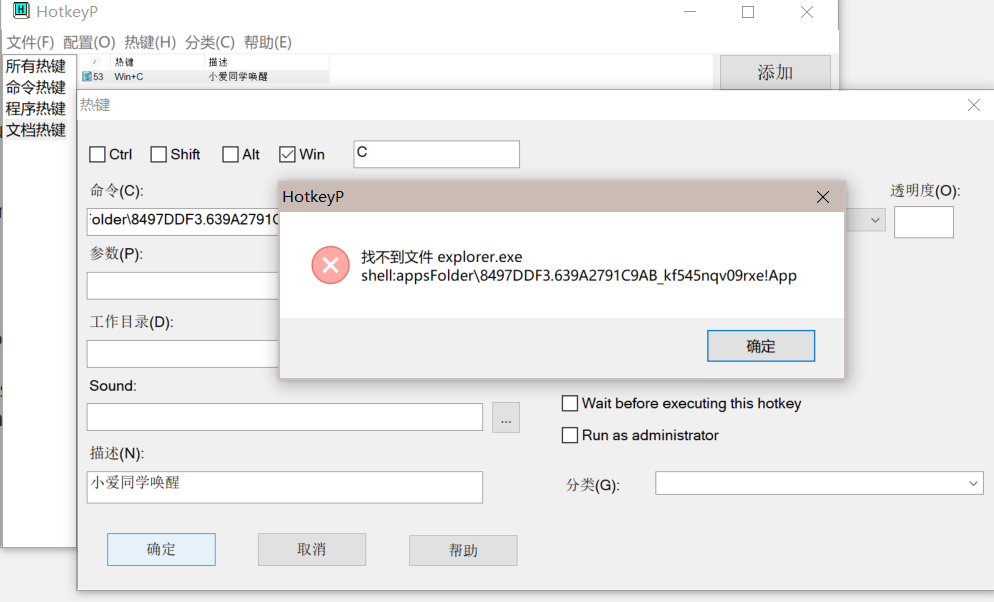
So the question changed once more: how do I make HotKeyP execute a command line directly?
The approach is also natural: write the command into a .bat script, store it on disk, and have HotKeyP call that script.
But when I tried it, a black console window flashed up whenever the .bat script ran, which was really annoying. I searched for how to run a .bat invisibly.
So using a .vbs script to execute the .bat script avoids the black window.
The final path to replace Cortana with Xiao Ai is now clear:
Use HotKeyP to bind the Win+C shortcut to a script that runs a .vbs file, and have the .vbs script call the .bat script without a console to wake the Xiao Ai UWP app.
The one flaw is that launching Xiao Ai from the command line takes about 3 seconds, and I haven’t found a fix for that yet.
That’s all.